
The dream of the open highway is a powerful force, drawing urban professionals away from their desks with promises of hidden trails, remote mountain vistas, and complete mental restoration. In our modern tech-driven world, the first instinct for most travelers preparing for an escape is to search for a digital solution. We naturally download the highest-rated mobile software, assuming that a modern travel planning app will magically handle the complex logistics of an overland journey.
We hand over our hard-earned vacation timelines to automated algorithms, believing that a digital trip planner can perfectly organize every stop, mileage calculation, and hotel booking. Unfortunately, relying blindly on a mainstream travel planning app often leads to an unexpected logistical nightmare. These automated platforms are built in clean tech incubators, completely isolated from the real-world variables that drivers encounter on rugged roads.
True travel security cannot be coded into a generic mobile application dashboard. When you leave major metropolitan areas, the polished user interfaces of standard tech tools quickly reveal their structural limitations. To protect your hard-earned time off, you must understand the critical vulnerabilities of relying solely on a conventional travel planning app. Centralizing your journey requires transitioning from rigid, automated code to flexible, human-vetted frameworks that keep you safe, organized, and truly free.
Table of Contents
The Core Vulnerability: Why Algorithmic Route Optimization Fails Real Drivers

The primary selling point of almost every mainstream travel planning app is automated route mapping. Software companies boast about their advanced mathematical spacing, claiming their systems can instantly sequence dozens of coordinates to create a perfectly streamlined driving route.
However, this automated approach completely erases real-world driving variables. A standard digital mapping tool treats every mile identically, failing to account for road surface quality, sudden mountain weather changes, or intense driver fatigue. If your software ignores these human elements, your journey can quickly turn into a stressful race against an impossible schedule.
The Illusion of “Point-to-Point” Mathematical Timeframes
An automated algorithm calculates driving times based on perfect, theoretical road conditions. When a travel planning app tells you a mountain route will take four hours, it is using straight-line geometric logic that ignores narrow cliffside passes, unmapped road work, or slow-moving local transport vehicles.
Relying on these rigid schedules creates unnecessary stress for the driver, forcing you to rush through beautiful landscapes just to stay on schedule. Real-world overland travel requires milestone-based pacing, not automated mathematical deadlines.
Real Road Obstacles That Software Cannot Forecast
Mainstream navigation software cannot predict dynamic, hyper-local road changes. An automated travel planning app has no way of knowing if a sudden landslide has blocked a remote pass, or if a local bridge is completely closed for seasonal maintenance.
The Offline Blindspot: How Grid Failures Turn Smart Tools Into Dead Screens

Modern software platforms are fundamentally dependent on continuous data streaming and cloud synchronization. Developers build these tools around active internet connectivity, assuming users will always have access to a reliable high-speed cellular network.
The moment your vehicle enters a deep mountain valley or a remote forested trail, this heavy reliance on the cloud becomes a dangerous single point of failure. A digital travel planning app can quickly turn into a useless, frozen screen when cell signals completely drop out.
The Fragility of Cloud-Dependent App Syncing
When your mobile connection drops, a standard travel planning app often loses its ability to pull up saved confirmation details, maps, and route itineraries. If your software cannot connect to its central server, you can easily lose access to your entire plan right when you need it most.
Relying on live digital synchronization leaves your trip vulnerable to local network outages, data roaming blackouts, and dead phone batteries.
Transitioning to Zero-Data Offline Blueprints
To keep your travels stress-free, you must ensure your vital route blueprints remain accessible 100% offline. Rather than putting your trust in a volatile digital travel planning app, expert overlanders utilize downloadable, hard-copy assets.
Our Premium Travel Blueprints and offline-ready Google Maps Route Guides are designed to remain fully accessible in zero-coverage zones. This ensures you preserve complete access to your custom checkpoints, emergency contacts, and route directions without needing an active data signal.
The Automation Trap: Why Automated Inbox Scanning Triggers Costly Booking Errors
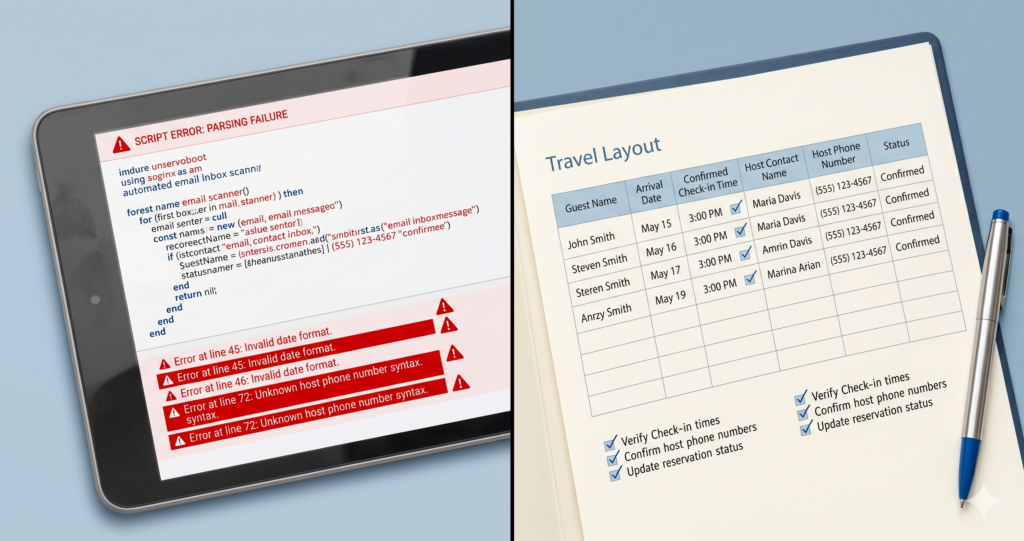
To make travel preparation feel completely effortless, several automated platforms offer direct email inbox integration. These systems automatically scan your incoming emails, pull out hotel and flight details, and attempt to build a unified schedule without any manual entry.
While this sounds convenient, automated parsing algorithms frequently misread complex text, leading to severe logistical errors that can easily disrupt your vacation plans.
When Mail Scanners Misread Your Booking Details
An automated travel planning app routinely struggles with non-standard email layouts, multi-room bookings, and personalized homestay receipts. A machine scanner can easily misread check-in times, confuse different time zones, or completely miss an important attachment containing your actual check-in instructions.
If your automated software registers the wrong check-in date, you might arrive at a remote boutique property only to find they have no record of your reservation for that night.
Preserving Manual Control via Unified Custom Templates
True logistical organization requires human oversight and manual precision. Instead of delegating your booking security to a generic machine scanner inside a travel planning app, you should centralize your logistics yourself.
Using a structured, human-vetted workspace ensures you catch critical details that automated scanners miss, keeping your check-in numbers, host contacts, and payment balances completely accurate and easy to review at a glance.
The Collaborative Chaos: Why Drag-and-Drop Timelines Fracture Group Dynamics

Group road trips are incredibly rewarding, but coordinating multiple passengers requires clear boundaries and transparent planning tools. Many software options try to solve this by offering open, real-time collaboration features.
While a shared travel planning app allows everyone to contribute ideas, giving multiple users unrestricted access to edit a single live timeline often leads to coordination confusion and group disagreements.
Too Many Editors: The Nightmare of Shared Multi-User Access
When four or five people are simultaneously dragging, dropping, and editing a shared itinerary on a travel planning app, the core plan quickly loses its cohesion. One traveler might adjust a departure time without realizing it completely disrupts a lunch booking down the road, while another might delete a vital fuel stop to add a generic tourist attraction.
Without a single, clear coordinator, an open digital workspace can rapidly turn into a chaotic mix of conflicting travel styles.
| THE GROUP DISCORD CHECKLIST |
| Conflicting route edits made simultaneously by different users |
| Hidden fuel stops accidentally deleted to add tourist attractions |
| Total lack of clear expense and cargo tracking protocols |
Building Shared Financial Clarity via Budget Sheets
Unrestricted multi-user editing tools rarely address the most important part of group travel: tracking shared expenses. To prevent awkward financial disagreements regarding fuel, tolls, and homestay deposits, groups need structured organization.
| Travel Expense Category | Coordination Method | Group Transparency Tool |
| Fuel Expenses & Tolls | Centralized Fund Tracking | Custom Budget Planner Sheets |
| Boutique Property Stays | Fixed Upfront Splits | Travel Notion Workspace Templates |
| Emergency Repair Reserve | Equal Team Contributions | Unified Shared Digital Cash Ledger |
By pairing your master route plan with our specialized Budget Planner Sheets, you give your team a transparent, visual breakdown of all costs, keeping everyone aligned without the confusion of an unmanaged mobile application.
Bypassing Programmatic Overhype: Securing Human-Vetted Travel Architecture
The tech industry wants you to believe that a complex algorithm is the ultimate solution for every travel challenge. However, experienced explorers know that software cannot replace real-world experience and human intuition.
A generic travel planning app relies entirely on basic data points and paid promotional placements, steering you toward crowded, uninspiring tourist traps. To find truly authentic experiences, you need to look beyond automated software recommendations.
Replacing Generic Travel Pins with Localized Regional Expertise
Algorithms are naturally biased toward high-volume commercial locations. A mainstream travel planning app will constantly direct you toward overcrowded resorts and generic highways because those spots have the most online data.
Finding quiet, offbeat homestays or rugged trekking trails requires deep, localized expertise. Real travel discovery comes from human curation, not from automated software feeds.
Unlocking Immediate Utility with Premium Notion Layouts
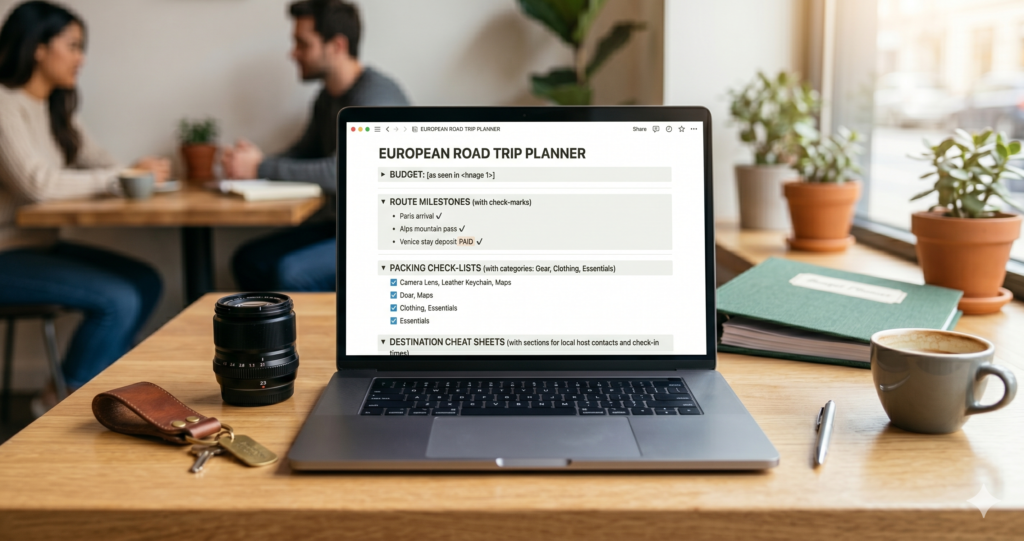
You do not need to deal with the constant notifications and battery drain of a heavy mobile application to keep your trip organized. Transitioning to our modular Travel Notion Templates gives you an elite, professional planning workspace without any technical clutter.
These clean, customizable templates allow you to organize your route milestones, manage your packing lists, and track your travel budgets in one highly reliable, structured, and easily readable dashboard.
Conclusion: Turning Blueprints Into Memories
Logistical preparation is the foundation of any great adventure, but the ultimate goal of planning is to step away from your screens and truly experience the world. Mainstream mobile applications often trap you in a cycle of constant notifications, battery anxiety, and rigid algorithmic timelines. True travel restoration is found when you step away from automated software and embrace flexible, human-curated exploration.
Do not let a generic travel planning app dictate the pace of your hard-earned weekend escapes. Take complete control of your next journey by exploring our field-tested road trip templates and hand-vetted premium travel blueprints. If you want to learn more about the human expertise behind our planning frameworks, feel free to visit our dedicated About Us page to see how we build reliable, offline-ready adventures.
We design our premium tools to handle the stress of logistics so you can focus entirely on creating unforgettable real-world experiences. For more professional tips on optimizing overland travel routes and bypassing standard software limitations, you can also follow my personal updates on LinkedIn to join our growing community of passionate, independent explorers.

Frequently Asked Questions (FAQs) About Travel Planning App Vulnerabilities
q: Can a mobile travel planning app completely replace a physical guide?
A: No. While a digital travel planning app is useful for storing basic reservation dates, it lacks the real-world intuition required to navigate remote routes safely. Software cannot forecast sudden road damage, identify authentic local dining spots, or provide vetted vehicle recovery steps when network connections drop out completely.
Q: How do I protect my itinerary files from sudden cellular data dropouts?
A:The most reliable way to protect your trip data is to maintain a dual-layered, offline backup system. Instead of relying entirely on a cloud-dependent travel itinerary planner, ensure you save high-resolution digital copies directly to your device and carry a printed, waterproof folder of your route maps and check-in details.
Q: Why do automated trip builders frequently make routing mistakes?
A:Automated systems rely purely on straight-line geographic logic and theoretical highway speed limits. They fail to understand changing road textures, local state border tax stops, and realistic driver fatigue intervals, which frequently causes them to generate exhausting, unrealistic timelines.
Q: What is the best way to manage shared group expenses without an app?
A: The most efficient method is using a centralized spreadsheet system before you depart. By utilizing our custom Budget Planner Sheets alongside your master route plan, you can establish clear upfront fund allocations for fuel, food, and lodging, eliminating awkward checkout conversations entirely.